| |||
|
| |||
|
All smartphones have Wifi capabilities, which are commonly used to communicate between different operating systems. We have implemented the Open Sound Control (OSC) interface for both Android and iOS. The OSC protocol is used to send UDP messages across the Wifi to an OSC-server, like FaceTrackNoIR.
You can test the OSC communication, even when you have not yet upgraded the App.
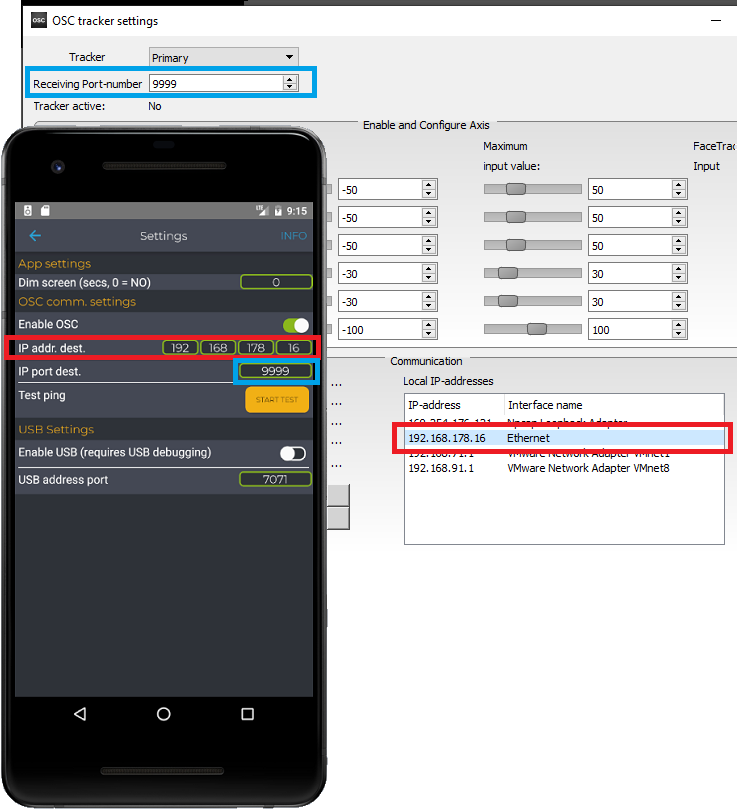
To use OSC communication, you must:
If you do not have FaceTrackNoIR (yet), you can find the IP-address of your PC using the Windows utility 'ipconfig'.
To verify that your PC can be reached by your smartphone or tablet, the 'Ping test' function was added. If the test returns OK, at least you know that the Wifi connection of your device is OK. If the test is not OK, this can mean two things:
If you have FaceTrackNoIR already, you can test the communication by selecting the Open Sound Control tracker plugin. After pressing START, you can open the OSC tracker settings page to see if packets arrive.
OSC is an open protocol, so there are quite a few (free) utilities available on the internet you can use. For example, we have tried UDP test tool:
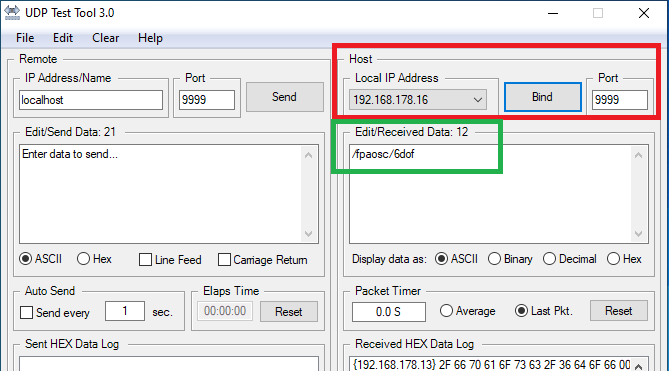
UDP test tool (ZIPped installer) can be downloaded here. Please note that this tool was not made by FaceTrackNoIR Team, so use it at your own discretion.
If you have an Android device and you cannot get the OSC interface to work, please try the USB interface.
|
|